Most chat applications follow a familiar architecture.
You type a message.
The application sends it to a server.
The server stores it.
Another device retrieves it.
Simple.
But while building US, a small private messaging application, I wanted to change one part of that model:
What if the server storing the conversation could not actually read it?
That question shaped almost every important technical decision in the project.
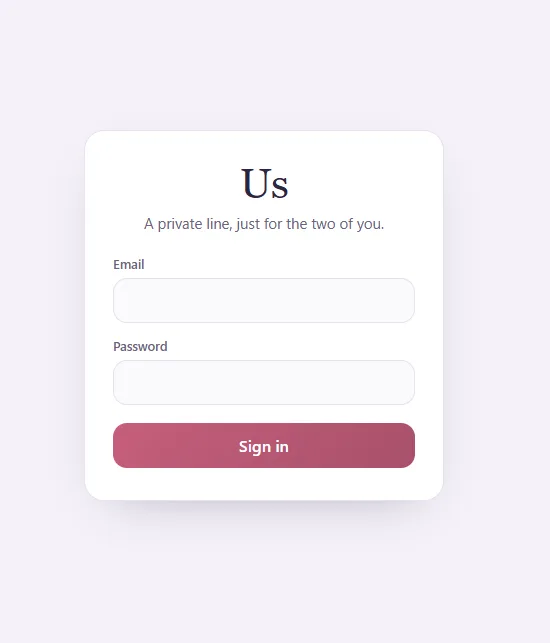
US is a private, real-time Progressive Web App built with React, Vite, Supabase and Netlify.
It has the features I would expect from a modern messenger — replies, attachments, read receipts, presence, typing indicators and notifications — but the most important part of the project is something the interface does not show.
The messages are encrypted before they leave the browser.
Treating the Backend as Storage, Not a Reader
Supabase handles several important parts of the application:
- Authentication
- Database storage
- File storage
- Realtime events
But I did not want the database to become the place where readable conversations lived.
So US separates authentication from message encryption.
Logging into the application proves that a user is authorised to access the system.
Decrypting the conversation requires something else entirely:
a shared passphrase.
The passphrase is agreed separately and is never stored as the encryption key in Supabase.
Instead, the browser derives the cryptographic key locally.
The basic flow looks like this:
Passphrase → PBKDF2 → AES-256 key → Encrypt in browser → Ciphertext → Supabase
When a message comes back:
Supabase ciphertext → Browser → AES-GCM decryption → Readable message
The important boundary is the browser.
Plaintext exists where it needs to be read.
The backend stores the encrypted representation.
AES-256-GCM in the Browser
The encryption scheme uses AES-256-GCM.
AES handles the encryption itself, while GCM provides authenticated encryption.
That distinction matters.
Encryption should not only prevent someone from reading a message. The application also needs a way to detect whether encrypted data has been modified.
The shared key is derived from the passphrase using PBKDF2 rather than using the passphrase directly as an encryption key.
All of this happens client-side.
The objective is straightforward:
Supabase should receive ciphertext, not the original message.
The same philosophy extends beyond normal text messages to supported attachments.
The Passphrase Gate
Because the encryption key is derived locally, entering the wrong passphrase means the application cannot correctly decrypt the conversation.
US therefore has a separate passphrase gate after authentication.
A correct account login alone is not enough to reveal message content.
The application also includes some defensive behaviour around that gate.
Three incorrect passphrase attempts trigger a 24-hour device lock, and an unlocked session automatically locks again after five minutes of inactivity.
These controls are additional application-level safeguards around access to the conversation.
They are not a replacement for the encryption itself.
The encryption is the important boundary.
Then I Had to Build an Actual Messenger
Encryption was the architectural challenge.
But a technically interesting encryption demo would not be particularly useful if the messaging experience was unpleasant.
So US gradually became a much more complete chat application.
Messages appear in real time and are organised with timestamps and day dividers.
The app also tracks:
- Typing state
- Online presence
- Away status
- Offline status
- Read receipts
- Read time
These features create an interesting contrast with encrypted message content.
The application needs enough shared state to provide a modern real-time experience while avoiding storing the actual conversation as readable text.
That made the project much more interesting than simply building another chat interface.
Read Receipts That Actually Tell You Something
A simple "read" indicator is useful.
A read timestamp is better.
US therefore shows not only that a message has been read, but also when it was read.
Again, this is a relatively small interface detail.
But private software has an advantage here: I can build exactly the behaviour the intended users want instead of designing for the broadest possible audience.
There is no product committee deciding whether a read timestamp improves engagement metrics.
It is either useful or it is not.
Replying Without Breaking the Flow
Conversations quickly become confusing when several topics overlap.
US supports direct message replies so a response can retain context.
The interaction changes depending on the device.
On mobile, a reply can be initiated with a swipe.
On desktop, the action appears through the message interface on hover.
I like this kind of responsive behaviour because mobile and desktop interfaces should not always be identical.
The function is the same.
The most natural interaction is different.
Presence Without Constantly Asking
US also maintains real-time presence.
A user can appear as:
Online
Away
Offline
This information updates dynamically rather than requiring manual refreshes.
There is also a typing indicator.
These are features that disappear when they work correctly.
Nobody thinks much about a typing indicator when it appears at the right moment.
When it is delayed, stuck or inaccurate, however, the application immediately feels unreliable.
Real-time systems are full of features like that.
The simplest-looking UI elements often require some of the most careful state management.
Encrypted Attachments
Text was only the beginning.
I also wanted to send files without abandoning the same privacy model.
US supports encrypted:
- Images
- PDFs
Attachments are encrypted client-side before storage and decrypted when accessed through the application.
Both can be downloaded by the authorised user after decryption.
Images have another small convenience feature:
paste-to-send.
Copy an image to the clipboard, paste it into the chat, and it can be prepared for sending without first saving and locating a separate file.
Again, it is a small feature.
But reducing tiny points of friction is what makes software pleasant to use every day.
Links, Emoji and the Small Things
Once the core messaging system worked, a lot of development shifted toward details.
Messages support clickable links.
There is an emoji picker.
Messages can be soft-deleted.
Unread activity is reflected in the browser tab.
Browser notifications can alert the user when appropriate.
There are four themes, stored per device.
None of these defines the project.
But together they are what turns a technical prototype into an application that can actually replace a conventional messenger for its intended use.
Designing for Connection Problems
Realtime does not mean permanently connected.
Phones sleep.
Networks change.
Wi-Fi disappears.
Browsers suspend background activity.
A real application has to expect that.
US therefore includes automatic reconnection behaviour as well as a manual refresh option when needed.
This is another lesson that repeatedly appears when moving from prototypes to software used regularly:
The happy path is only one path.
An application has to recover gracefully when the environment around it behaves imperfectly.
A Very Small Audience Changed the Design
US is intentionally not a public social platform.
There are no public profiles.
No follower system.
No discovery.
No algorithmic feed.
No engagement mechanics.
No advertising.
No need to optimise how long somebody remains inside the application.
That removes an enormous amount of complexity.
Instead, the design question becomes much narrower:
What does a private conversation actually need?
That led to a surprisingly focused product.
Fast messages.
Replies.
Photos.
Documents.
Presence.
Read status.
Notifications.
And privacy.
Everything else has to justify its existence.
The Heart and the Name
The application is simply branded US.
Its visual identity uses a heart as the app icon.
I wanted the interface to feel different from a corporate messaging platform.
The project is small and intentionally personal, and the branding reflects that without exposing who uses it or what is discussed inside it.
That is another advantage of building software for a very specific purpose.
Not every application needs to look like a startup.
Why I Didn't Stop at Authentication
This project also reinforced an important distinction:
Authentication and encryption solve different problems.
Authentication answers:
Who is allowed into the application?
Encryption answers:
Who can understand the information stored inside it?
A perfectly configured login system does not automatically mean the application's database cannot read the content.
That distinction was one of the main reasons I wanted to build US.
Supabase remains responsible for authentication, persistence, realtime communication and infrastructure.
But readable message content is kept on the client side of the cryptographic boundary.
What the Server Sees
Conceptually, the system is designed so the backend works with encrypted data rather than message plaintext.
Instead of storing:
Are we still going out tonight?
the database stores encrypted data that is meaningless without the correct key.
The application retrieves that encrypted value and performs the decryption locally.
This is the part of US that I find most interesting.
The database is essential to the application.
But it does not need to understand the conversation in order to store and synchronise it.
Finished Software Is Different From Finished Features
US is now complete enough to be used regularly.
The main messaging system works.
Encryption works.
Realtime works.
Attachments work.
Replies work.
Read receipts work.
Presence works.
The app locks itself when inactive and reconnects when connectivity changes.
There are still ideas I could add:
- Voice messages
- Full push delivery when the application is closed
- A dedicated subdomain
- Additional interface polish
But those are enhancements.
They are no longer blockers.
And that is an important point in personal software development.
There will always be another feature.
At some point, the better question is not:
"What else can I add?"
It is:
"Does the software already solve the problem I built it for?"
For US, the answer has reached the point where the application is no longer just a development project.
It is software being used for the reason it was created.
And for me, that is a much more meaningful milestone than adding another item to the feature list.


Join the conversation
Loading comments…